

Feeling like you’re stuck on a content hamster wheel with zero energy left to sell your offers?
If posting everywhere (YouTube, Instagram, email) feels like shouting into the void while scrambling just to stay visible, you’re not alone.
Content burnout is real... but it’s also avoidable.
Imagine sitting down for just three hours, and walking away with 15+ scroll-stopping, sales-focused pieces of content ready to go.
That’s exactly what you can achieve with the right batch content creation approach.
After helping businesses create high-performing content for more than five years, I've developed a repeatable workflow that turns one long-form piece of content into weeks of strategic posts.
And in today's article, I’ll be sharing this exact workflow with you!
What is Batch Content Creation and Why Do You Need It?
Batch content creation is the process of creating an entire week or month's worth of content in a focused block of time.
So, instead of grinding out posts day by day, you carve out just a few hours to create as many posts as you possibly can (while keeping quality top-notch, of course).
And the best part? If you approach it the right way, you create an entire content ecosystem using ONE piece of content (that you repurpose across all your platforms).
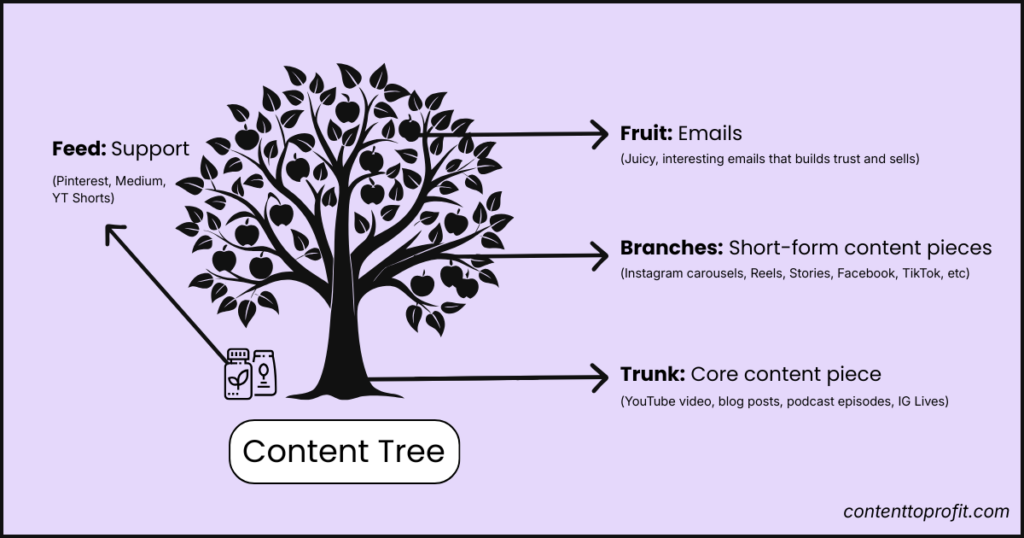
To simplify the process, you can think of it as a tree — where the different types of content can be categorized into the four main parts:
Step 1: The Content Trunk – Start by creating a core piece of content (like a YouTube video, blog post, podcast episode, or webinar). This should be a strong, strategic, long-form post that has a lot of "meat" and valuable information you can easily share in bite-sized pieces.
Step 2: The Content Branches — From that one piece, create multiple short-form posts for Instagram, TikTok, Facebook, and beyond. These extend your reach and visibility with minimal extra effort.
Step 3: The Content Fruit — These are your emails. Juicy, irresistible, and full of value so you can turn your subscribers into buyers.
Step 4: The Feed — Platforms like Pinterest and Medium help more people discover your tree. It’s where your content grows roots in new places, bringing fresh eyes to your ecosystem.
Each part is designed to squeeze the most from your content — and every hour you take to create it. Let’s break down how to start batch content creation in a way that actually works.
How to Batch Content (Step-by-Step)
Contrary to popular belief, batching content doesn’t have to be exhausting. By following the right process you’ll actually spend less time creating more content, all while maximizing your results. Below are the exact steps you can follow to get started.
Step 1: Create Your Core Content Piece
The trunk of your content tree is one solid, substantial piece that supports every branch. This core content is your anchor — rich, detailed, and brimming with value.
For me, that usually means a YouTube video, but it could just as easily be:
- Blog posts
- Podcast episodes
- Instagram Live streams
- Or even webinars, membership lessons, interviews, etc
The goal? Make your core piece thorough enough to split out into dozens of smaller posts, each speaking to a single topic or angle. You can use strategic content pillars (i.e. your umbrella content topics) to come up with the best angles for these posts.
Why YouTube Is the Smartest Core Platform
Nothing builds trust quite like video. When your audience sees you speaking and hears your voice, it humanizes your brand and grows a sense of connection. In an AI-heavy world, authentic face-to-face moments are more important than ever for trust-building.
Unfortunately, most creators and online business owners avoid YouTube like the plague because it can be a little more difficult to get started. But that’s a good thing, because it means if you use this powerful platform, you stand out.
And the best part? The sky is the limit when it comes to repurposing video content. One good video can become countless reels, Instagram posts, tweets, audio bites, or even written content guides.
Now, you’re probably thinking, but creating a video will take too long, Chanté.
No it won't.
How to Create a YouTube Video in Two Hours
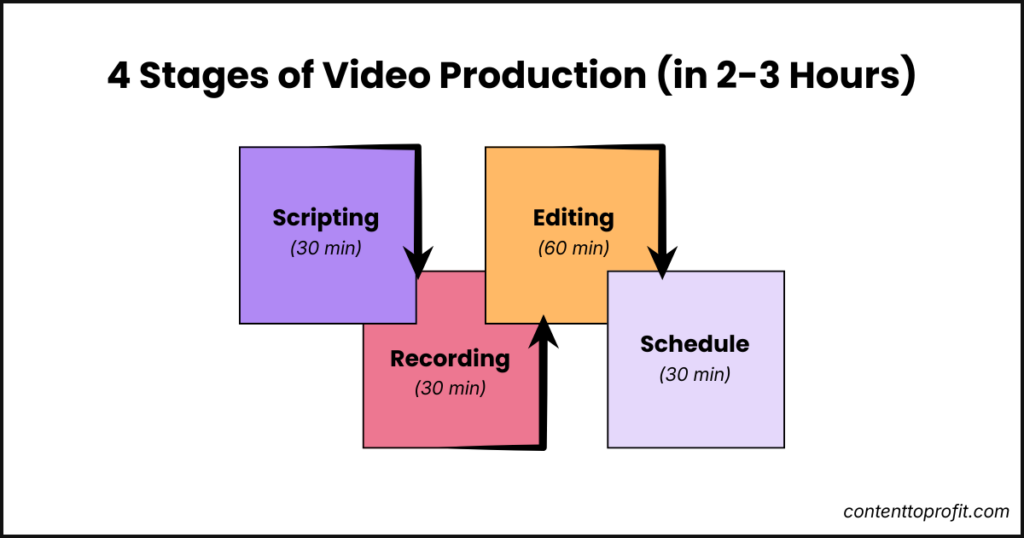
Here’s how you can fit robust video production neatly into a two-hour slot each week:
Scripting (30 mins): Use ChatGPT or another AI tool to help you come up with your script. But only use it for a rough outline and research. Then build it out with your own insights, frameworks, and stories. This gives structure while letting your true voice shine.
Recording (30 mins): Shoot the video — while keeping things as simple as possible. I like to imagine that I’m talking to a friend to take off the pressure of being on camera. Plus, you can even batch record multiple videos for an even faster workflow. Simply script several videos ahead of time, set up your recording space, and record multiple videos in one go.
Editing (1 hour): Tools like Descript make editing a breeze. With a text-based editor, you can slice and trim without fuss. This means your editing process is direct and lightning quick. Learn the step-by-step process to edit your videos with Descript in an hour.
Design your thumbnail and schedule (30 mins): Use Canva to design your thumbnail. Simple thumbnails do really well nowadays because people can see it wasn't created by AI. Then, upload and schedule your video (again you can do multiple videos in one go).
But, as I mentioned, you don't need to create videos. You can just as easily do the next steps with blog posts, podcast episodes, or any other type of long-form content piece.
Step 2: Use AI and Smart Repurposing for Short-Form Platforms
Once the core post is done, let technology do the heavy lifting. Here’s how:
- Take your YouTube transcript, blog post, or podcast transcript
- Drop it into ChatGPT
- Use a set of tuned prompts to turn the transcript into fresh content for Instagram (reels, carousels, stories), TikTok, or even Facebook
This means no more staring at a blank screen, wondering what to post.
But, please DON’T just copy and paste. That gets repetitive really fast and your audience will end up getting bored.
Instead, make sure you use different content angles.
The 9 Content Angles
Reposting the same points everywhere is a mistake. Instead, by using these nine content angles, every post you create will feel fresh and lead your audience through the buyer journey.
- Pain Points
- Mistakes and Myths
- Hot Topics
- Tips
- Belief Shifts
- Personal Stories and Behind-the-Scenes
- Objections
- Social Proof
- Offer Breakdowns (Sales)
Let me show you an example:
Imagine you film a YouTube video on how you lost 20 pounds eating paleo. That one video can become:
- An Instagram carousel unpacking one tip in depth.
- A myth-busting Instagram reel about the errors most people make with paleo.
- A belief-shifting post challenging the need to eat perfectly clean to see results.
This way, you’re never just copying and pasting. Instead, you’re bringing out different sides of the story and it looks like new content every time.
Want help with this? I’ve put together a step-by-step 1 to 10 content repurposing guide which walks through how to turn one big piece of content into at least 10 unique posts. It’s free and can save you hours every week.

Step 3: Turn Your Content Into Engaging Emails
Now that you’ve branched out on social, it’s time to focus on the fruit (a.k.a. emails).
Your emails must be juicy, irresistible, and packed with the stuff that builds deep trust and leads to sales.
Here’s how to make writing them effortless:
- Drop your transcript into ChatGPT again
- Use prompts to pull out story-driven email content ideas
- Focus on personal connection
The great thing about video or podcast transcripts is that you’ve already used your own tone of voice and personality in these content pieces. So, this makes it easy for ChatGPT to provide personality-driven emails that create genuine connections with your list, rather than bland or generic newsletters.
Example snippet:
Sticking to the paleo YouTube video example from earlier, your email could look something like this: '
"Last year, I struggled through several diets that kept me hungry and dissatisfied. But, when I switched to paleo, just a few small changes to my overall diet helped me lose 20lbs in just 3 months — without getting hungry! Here's exactly how I did it."
These emails are where the sales happen, so don’t underestimate the power of repurposing your existing content into weekly emails.
Step 4: Create Content That Brings More Traffic to Your Content Pieces
Once you’ve got your tree full of content, it’s time to feed it.
Platforms like Pinterest, Medium, YouTube Shorts, or even Reddit are where your content tree gets discovered. These are high-traffic discovery channels that drive new people into your world.
- Turn blog posts into Medium articles
- Pin carousel posts from Instagram onto Pinterest boards
- Use YouTube Shorts to get more people to watch your full videos
- Answer questions on Reddit to get more people to your blog posts
This is how your tree grows roots in new places, bringing new people into your content ecosystem every day.
Bonus: Turn Video Content Into Blog Posts for Extra Reach
Don’t stop with social and email. Your YouTube video can become a full blog post to reach new audiences and tap into search traffic.
When my client Lisa turned her videos into blog posts, we published them on her website and on Medium. The result? Hundreds of new leads discovering her work, all from content she’d already created.
Blog posts offer extra SEO and AEO power and can establish your name beyond your main platforms.
How This All Adds Up
One good YouTube video, filmed once, can become:
- 10+ social media posts
- Several reels or stories
- Engaging weekly emails
- A long-form blog post
- And more
In other words, it allows you to easily keep a steady stream of content live across every platform without scrambling each day.
Tools, Resources, and Getting Started
Ready to batch content like a pro and free up your time? Here’s how to take the next step:
- Download the free 1 to 10 Content Repurposing Guide: See all the steps in action and start batching fast.
- Want to start your own YouTube channel but stuck on gear? Watch my equipment and tools video for clear advice tailored to beginners and growing creators.
- Need to edit videos fast, even if you hate editing? Check out my Descript video editing walkthrough for hands-on tips.
Final Thoughts: Content Batching to Save Time
You don’t need to be chained to your laptop or phone to build a thriving online presence.
With this four-step batch content system, you can spend just three hours a week creating content that brings consistent traffic, leads, and sales to your online business.
The content creation process is easier than you think, and with tools like ChatGPT, Canva, and Descript, anyone can do it (even if you’re super busy).
Remember to download the free 1 to 10 Content Repurposing Guide for even more examples and a step-by-step repurposing workflow.